

Top 10 Travel AI Prompts for Men’s Adventurous and Scenic Journey Photography
Men’s travel and adventure photography has moved far beyond simple snapshots. Today’s AI image generators can craft full-body portraits that feel ripped from a high-end magazine or a blockbuster film, blending rugged scenery with impeccable style. This collection of ten prompts offers a ready-made toolkit for anyone who wants to explore masculine portraiture without a professional crew, expensive gear, or a passport.
Each prompt in this set shares a common DNA: ultra-realistic skin texture, cinematic lighting, shallow depth of field, and a clean or dramatically layered background that keeps the focus on the man. Whether you are drawn to the boardroom power of a charcoal blazer against a dusk cityscape or the raw intensity of tactical gear in a ruined street, these descriptions give the AI everything it needs to build a cohesive, visually striking series.
What this collection of men’s adventure prompts is asking for
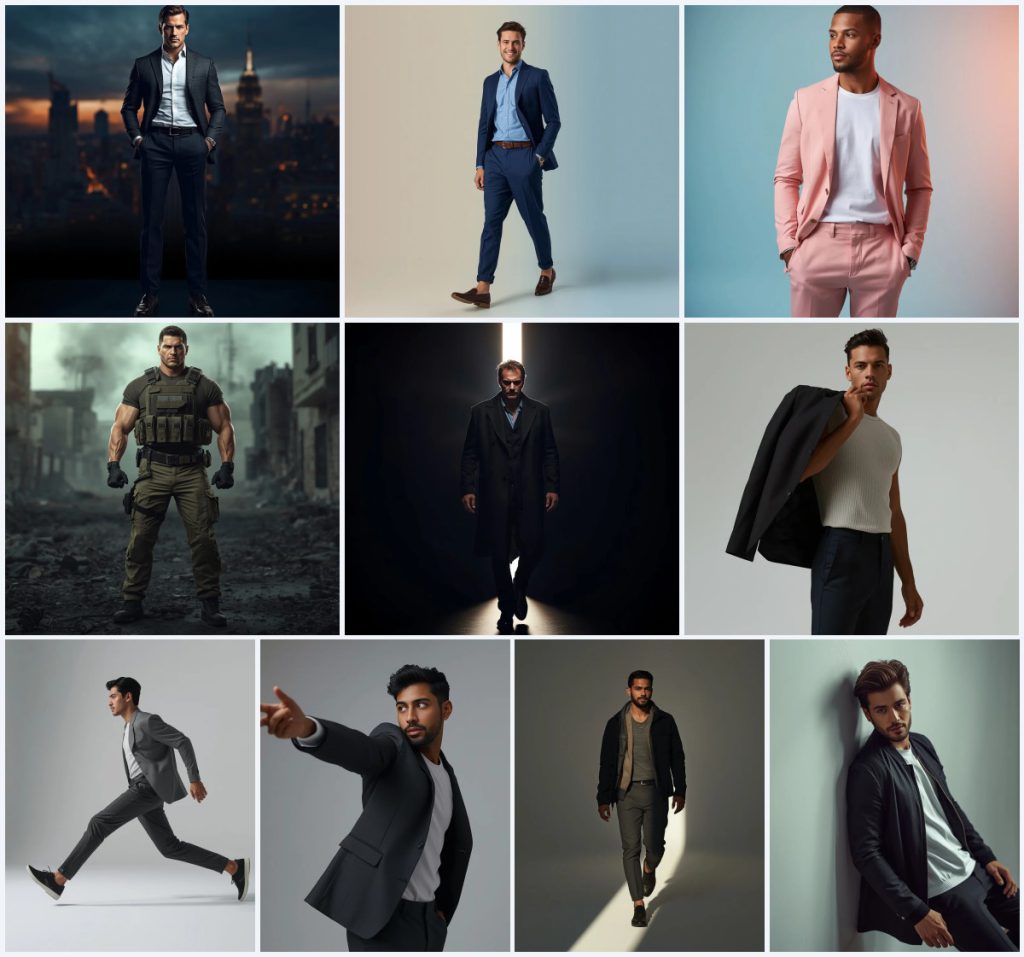
Across all ten prompts, the AI is instructed to render a powerful or stylish man in a full-body shot, emphasizing posture, expression, and the interplay of light with fabric and skin. The aesthetic ranges from corporate power and lifestyle influencer to survivalist strength and editorial motion, but every description anchors the image in ultra-realism, 8K resolution, and a cinematic or DSLR photography style.
- A powerful man standing tall with one hand in his pocket, wearing a modern charcoal blazer against a dusk cityscape
- A stylish man in a navy blue linen suit walking forward with a warm smile in a minimalist studio
- A man in a pastel pink casual suit standing relaxed with hands in pockets, looking away from the camera
- A powerful man in full tactical gear standing alert in a desolate urban battlefield with rubble and smoke
- A man in a long dark coat walking through a narrow beam of light cutting across darkness
- A stylish man letting his jacket drop slightly off one arm in an editorial fashion pose
The visual world these prompts build
The collection moves through three distinct environments. Several prompts place the subject inside a "clean, minimalist studio with a soft beige and blue gradient" or a "soft blue and peach gradient," where the man becomes the sole focal point. These studio setups, described with phrases like "bright, natural-looking light" and "soft, natural-looking key light," create a lifestyle-influencer mood that feels polished and viral-ready.
The outdoor and dramatic settings push the mood much further. One prompt calls for a "dramatic cityscape at dusk, with gleaming skyscrapers and vibrant city lights," while another drops the man into a "desolate urban battlefield, rubble, and smoke." The most atmospheric prompts use light itself as a character, with a man "walking directly through a narrow beam of light cutting across darkness" or "walking slowly through a beam of light, creating dramatic highlights and deep shadows across his body."
Why these prompts work for men’s travel and adventure portraits
These prompts succeed because they combine strong, readable silhouettes with detailed texture instructions that prevent the plastic-skin look common in AI-generated people. Every prompt includes a clear emotional cue—determined gaze, warm smile, calm confidence—which gives the generator a target for facial expression. The consistent demand for cinematic lighting and shallow depth of field ties the set together visually, making it easy to produce a coherent portfolio or social media carousel.
- The prompts specify exact clothing textures like "navy blue linen suit" and "tactical gear—bulletproof vest, cargo pants, and combat boots," giving the AI concrete material references
- Lighting instructions such as "cinematic, high-contrast lighting" and "soft lighting creating smooth highlights and shadows" guide the mood without leaving it to chance
- The full-body framing and relaxed or powerful poses create a consistent editorial look that works across Instagram, portfolios, and concept boards
Three visual styles running through the collection
Although the prompts share a realistic foundation, three distinct visual styles emerge. The first is a clean lifestyle-influencer aesthetic seen in the studio portraits with pastel suits and soft gradients. The second is a high-contrast cinematic power style, visible in the cityscape and tactical gear scenes. The third is an artistic editorial motion style, where the man slides, extends an arm, or walks through light beams, emphasizing movement and gesture.
- Lifestyle-influencer studio: The navy linen suit and pastel pink casual suit prompts use soft gradients and natural key light to create a clean, approachable look suitable for modern branding.
- Cinematic power and survivalist: The charcoal blazer cityscape and tactical gear battlefield prompts rely on dramatic, high-contrast lighting and intense expressions to project authority and resilience.
- Editorial motion and gesture: Prompts featuring a jacket dropping off one arm, a foot sliding forward, or walking through a light beam emphasize fabric movement and dynamic composition with shallow depth of field.
How to generate these men’s adventure portraits step by step
Start by picking the prompt that matches the mood you want, then copy its full text exactly. Paste it into your chosen AI image generator, keeping the descriptive clauses intact. If your tool supports a reference image, upload a photo with clear full-body framing and lighting similar to the prompt’s description. After generating, inspect the hands, face, and main clothing details at full resolution, and re-run with small tweaks if fingers appear fused or the gaze looks unfocused.
- Copy the full prompt text. Select the complete description from the collection, including every detail about clothing, lighting, and background, and copy it without alterations.
- Upload a reference photo. If your generator allows image inputs, use a full-body reference with a similar pose and lighting direction to guide the AI’s composition and skin texture.
- Generate the image. Paste the prompt into ChatGPT, Google Gemini, Leonardo AI, or Midjourney, and generate at the highest available resolution to preserve fabric and skin detail.
- Check the hands and face. Zoom in on the fingers and facial features. Look for fused digits, asymmetrical eyes, or a blank stare, and flag any image that needs a re-roll.
- Inspect the main clothing object. Examine the blazer lapels, tactical vest straps, or linen suit texture to ensure the AI rendered the material correctly without melting it into the background.
- Refine and re-generate. If details fail, adjust the prompt slightly—such as adding ‘perfect hands’ or ‘sharp facial features’—and generate again until the image meets your standard.
Choosing the right reference photo for these prompts
A well-chosen reference photo can dramatically improve the AI’s output, especially for full-body shots where posture and lighting direction are critical. The reference does not need to match the outfit; it should mirror the pose, framing, and light angle described in the prompt.
- Use a full-body reference with the subject standing or walking in a relaxed, confident posture to align with the prompt’s pose instructions
- Match the lighting direction—side light for the light-beam prompts, soft front light for the studio gradients, and dramatic top or back light for the cityscape and battlefield scenes
- Choose a reference with a clean or uncluttered background so the AI focuses on the subject and does not carry over distracting elements from the photo
AI tools suited for these men’s adventure prompts
Different AI image generators handle fabric texture, skin realism, and cinematic lighting with varying success. The table below compares four widely used tools and notes a specific detail each one can bring to life from this collection.
| Tool | Access | Typical realism | Useful here for |
|---|---|---|---|
| ChatGPT | Built-in DALL·E integration | High, with strong prompt adherence | Rendering the polished leather shoes and charcoal blazer in the cityscape dusk scene |
| Google Gemini | Web and app | Moderate to high, improving rapidly | Capturing the soft beige and blue gradient behind the navy blue linen suit |
| Leonardo AI | Web platform, free tier available | High, with excellent cinematic presets | Producing the smoke and rubble atmosphere in the tactical gear urban battlefield prompt |
| Midjourney | Discord-based, paid tiers | Very high, known for artistic lighting | Sculpting the dramatic highlights and deep shadows as the man walks through a beam of light |
Three tips for getting the most from these prompts
Small adjustments to your workflow can make the difference between a generic render and a portfolio-worthy portrait. Focus on the materials and objects named in the prompts to guide the AI toward a cohesive result.
- Emphasize the linen suit texture by adding ‘visible weave’ or ‘natural fabric drape’ if the AI makes the navy blue linen look flat or synthetic
- For the tactical gear prompt, reinforce ‘weathered combat boots’ and ‘scuffed bulletproof vest’ in a follow-up run to add realism to the survivalist aesthetic
- When generating the light-beam walking scenes, specify ‘volumetric light rays’ or ‘dust particles in the beam’ to enhance the cinematic depth described in the prompt
Common issues with these prompts and how to fix them
Even well-written prompts can produce glitches, especially in full-body shots where hands, fabric edges, and background details interact. The table below lists four frequent failures and the specific changes that usually resolve them.
| Issue | What to change |
|---|---|
| Fused or extra fingers in the hand-in-pocket pose | Add ‘clearly defined individual fingers’ and reduce the weight of the pocket description so the AI does not merge hand and fabric |
| The blazer or suit jacket blending into a similarly colored background | Increase the contrast between the garment and the background by specifying ‘charcoal blazer against warm city lights’ or ‘navy suit against soft beige’ |
| The tactical vest appearing as a flat, unpainted block | Add ‘visible straps, buckles, and fabric folds on the bulletproof vest’ to force the AI to render structural details |
| The light beam washing out the subject’s face or body | Adjust the prompt to ‘narrow beam of light illuminating only one side of the body, face partially in shadow’ to preserve facial detail |
Frequently Asked Questions
Can I mix elements from different prompts in this collection?
Yes, the prompts share a common realistic and cinematic foundation, so you can combine, for example, the navy blue linen suit with the cityscape background or the pastel pink suit with the light-beam walking setup. Just keep the lighting and texture instructions consistent to avoid visual clashes.
Which prompt works best for a professional LinkedIn or corporate headshot alternative?
The ‘Powerful Man in Modern Blazer, Cityscape Background’ prompt is the strongest choice for a corporate look, thanks to the charcoal blazer, crisp white shirt, and polished leather shoes set against a dramatic but professional dusk skyline.
Do I need a reference photo for the motion-based prompts like the jacket drop or sliding foot?
A reference photo is not strictly required, but it significantly improves the AI’s ability to render natural fabric movement and balanced posture. If you skip the reference, you may need a few extra regeneration rounds to get a convincing pose.
Conclusion
This collection of ten men’s travel and adventure prompts gives you a versatile starting point for creating ultra-realistic, emotionally resonant portraits. From the polished confidence of a studio shoot to the gritty intensity of a battlefield, each prompt is built to deliver a specific mood while maintaining the high-resolution, cinematic quality that makes AI-generated photography stand out. With the right tool, a thoughtful reference image, and a few careful tweaks, you can turn these text descriptions into a cohesive visual story that feels both aspirational and authentic.
Remember to edit and refine only photos you have the legal right to modify, and always respect the original creator’s permissions when using reference images.